
Automate Figma, Photoshop, Canva & Illustrator graphics
Batch-generate variants of artwork made in Figma, Photoshop, Canva or Illustrator — personalized fields, multiple sizes, hundreds of outputs — with no design software running in your pipeline.
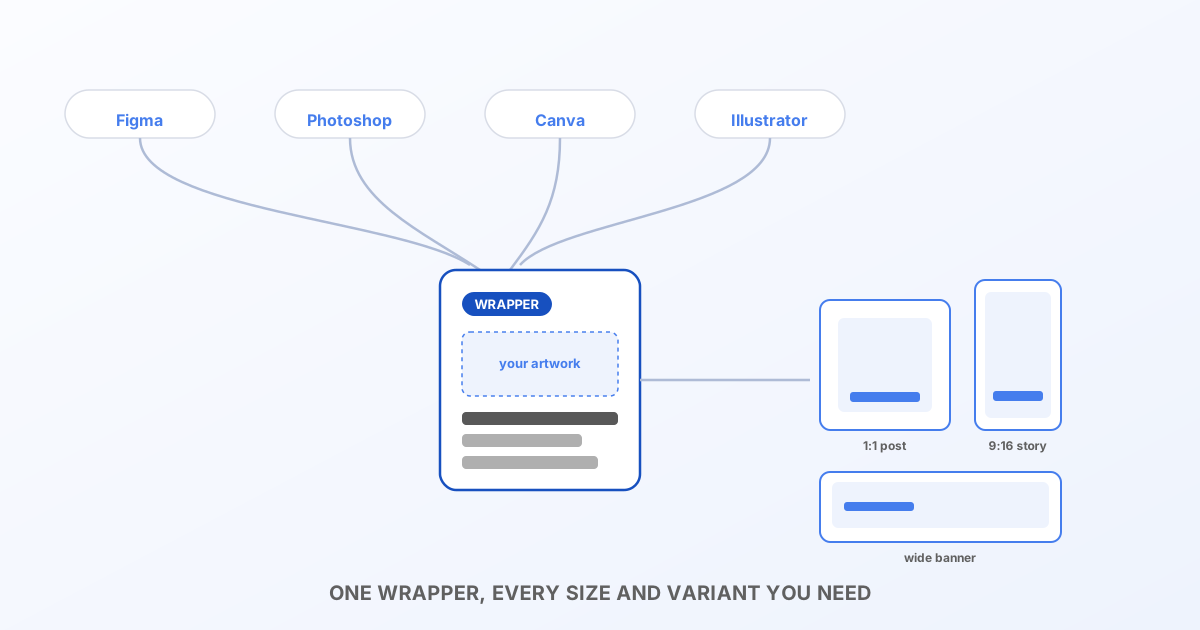
The problem
You designed a social post in Canva, a banner in Figma, a product shot in Photoshop, an icon set in Illustrator. Now marketing wants fifty versions with different names, fifty different sizes, or a weekly refresh with new numbers — and none of those tools are built to be called from a script. Someone opens the app and does it by hand, every time.
Bluepic's IDML API is a plain HTTP endpoint built for exactly this: render a template with different field values, at scale, from your own automation. It doesn't speak Figma's or Canva's file formats directly — but a thin InDesign wrapper around your existing artwork (five minutes to set up, once) turns any of them into an automatable pipeline.
The pattern
1. Export your artwork. From Figma or Canva, export PNG, JPG or PDF. From Photoshop or Illustrator, keep the native PSD/AI or export flattened — either works. PDF is the simplest universal choice if you're unsure.
2. Wrap it in InDesign, once. File → Place the exported artwork into an InDesign document, add the text frames (or other elements) you want to control programmatically — a name, a price, a date, a location — then File → Export → InDesign Markup (IDML). This file is your reusable template from now on.
Draw each of those frames with headroom for your longest real value (a long store name, a long price string) — the frame's size is a hard ceiling for anything you substitute in later, not just a starting point. See Text frames, bounds & best practices.
3. Render it from code.
const variants = await getVariantsFromYourData(); // e.g. 50 store locations, 50 SKUs, 50 event dates

for (const variant of variants) {
  const textOverrides = {
    '0:TextFrame_headline': variant.title,
    '0:TextFrame_price': variant.price,
  };

  const form = new FormData();
  form.append('idml', bannerIdml);
  form.append('assets', backgroundArt, 'background.pdf'); // your Figma/Photoshop/Canva/Illustrator export

  const res = await fetch(
    `https://api.bluepic.io/api/idml/render?format=png&textOverrides=${encodeURIComponent(JSON.stringify(textOverrides))}`,
    { method: 'POST', headers: { Authorization: apiKey }, body: form },
  );

  await saveFile(`banner-${variant.id}.png`, await res.blob());
}
Linked PDF, AI, EPS and PSD assets are rasterized automatically on Bluepic's servers — nothing from Adobe or Figma needs to be installed anywhere near this script.
Multiple output sizes from one file
width and height query parameters override the rendered size independent of the document's own dimensions — useful if the same layout needs to ship as a square post and a story-format crop. Render the same request twice with different dimensions rather than maintaining two separate template files.
Where the field keys come from
Load your wrapper IDML into the interactive API playground once, tick the override checkbox, and it lists every text element with an empty input — type into the ones you want to control and copy the generated textOverrides JSON as your starting shape. From there, driving the same keys with real data from your own system is the whole job.
Credits
Every account gets 100 free credits a month, 1 credit per rendered output. Fifty banners in three sizes is 150 renders; check usage or ask about higher volume on the account page.
Next steps
- Get your API key and try the playground with your own artwork.
- If the automation is specifically about shipping the same design in multiple languages rather than multiple data variants, see Translate Figma, Photoshop, Canva & Illustrator graphics automatically.
- Read the full API reference for every parameter, including
pages,dpiandengine. - If a field needs mixed formatting (part bold, a different color), see Rich text format for overrides.