
Rich text format for overrides
The exact JSON shape textOverrides expects when a text element has mixed formatting inside it — fields, defaults, line breaks, and a full worked example.
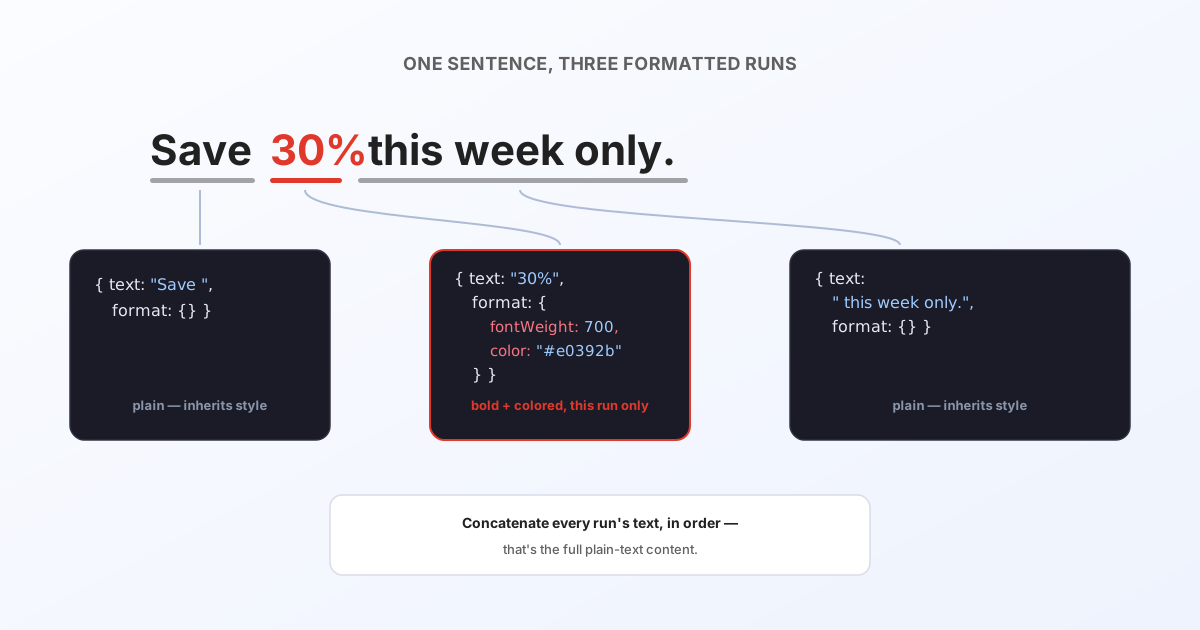
Most text elements are plain — a single string is all textOverrides needs for them. But when a text element has mixed formatting inside it (part bold, a different color on one word, a linked phrase), it's in "rich text" mode, and its override value needs to be a small array of formatted runs instead of a plain string.
How to tell which mode an element needs
You don't have to inspect the IDML for this — load the file into the Convert tool or the API playground and open the text-overrides table. Plain elements get a normal text box; rich-text elements get a small formatting toolbar on their input automatically. If you see the toolbar, that row needs the array shape below, not a string.
The shape
A rich-text override value is an array of runs. Each run is a chunk of text plus the formatting that applies to just that chunk:
[
  { "text": "Save ", "format": {} },
  { "text": "30%", "format": { "fontWeight": 700, "color": "#e0392b" } },
  { "text": " this week only.", "format": {} }
]
Concatenate every run's text in order and you get the plain-text content — "Save 30% this week only." here. The format object carries only what's different from the element's own base style; an empty {} just means "use whatever the element already looks like."
format fields
Every field is optional — omit one to inherit the element's base value rather than overriding it.
| Field | Type | Effect |
|---|---|---|
fontWeight | number (100–900) | Weight of just this run. |
fontStyle | 'normal' | 'italic' | 'condensed' | Style of just this run. |
fontSize | number (px) | Size of just this run. |
letterSpacing | number | Tracking, as a ratio (InDesign-style), for just this run. |
color | string | Any CSS color for just this run's text. |
href | string | Wraps this run in a link (carries through to PDF export). |
fontFamily and a horizontal scale also exist on the underlying type, but there's no need to set them per run: a font-family or scale difference always causes the conversion to split that content into a separate element rather than a mixed run within one element (see Text frames, bounds & best practices) — so within a single rich-text array, every run already shares the same family and scale by construction.
Line breaks
A literal \n inside a run's text is a valid line break — you don't need a separate array entry per line, just embed \n wherever a break belongs within a run.
A full request example
Plain and rich-text keys sit side by side in the same textOverrides object without any special marker — the shape of each value is all that distinguishes them:
{
  "0:TextFrame_headline": "Willkommen in Berlin",
  "0:TextFrame_promo": [
    { "text": "Save ", "format": {} },
    { "text": "30%", "format": { "fontWeight": 700, "color": "#e0392b" } },
    { "text": " this week only.", "format": {} }
  ]
}
Next steps
- Text frames, bounds & best practices — why an element ends up plain vs. rich text in the first place.
- Full API reference for
textOverridesand every other render option.